
Software built for pool service pros.
The route repeats, the water needs reading, and the chemicals go in whether or not anyone bills for them. OrbitOps Pro is built around all three.
Weekly routes, chemistry logs and truck stock in one clean system.
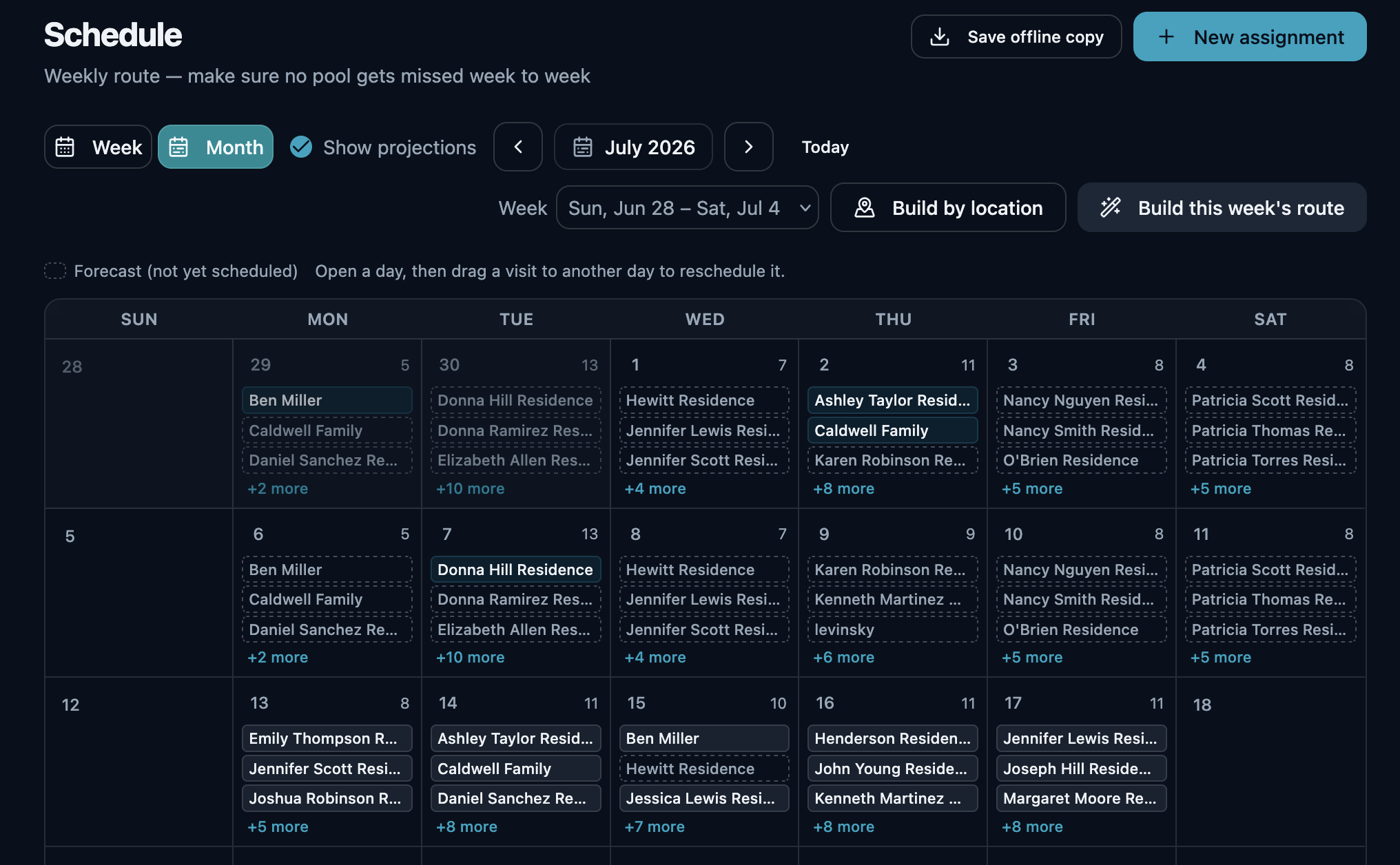
A pool route lives and dies on two things: hitting every stop on schedule, and actually charging for the chlorine, acid and shock you burn through along the way. Most operators nail the first and quietly bleed money on the second.
OrbitOps Pro is built around the weekly route. Your techs run today's pools from their phone, log the visit as they work, and what they added becomes an invoice line — so the water stays balanced and so does your P&L.
A route that rebuilds itself every week
You set the cadence once per pool. After that the days arrive already built, and nobody spends Sunday night rewriting a spreadsheet.
Recurring stops, generated for you
Weekly, bi-weekly or your own rhythm, set per pool. One click builds the week for every customer that comes due, across every service they are on and including anything carried over from a missed week — so each day comes up as a built list your techs work through in order, with nobody re-entering the same forty properties every Monday.
The Friday pool stays on Friday
Every recurring stop works one of two ways, set per customer. Anchor it to a day when the pool has to be ready — the Friday clean before a weekend of guests keeps its day, and the route builder never moves it. Or leave it loose and let clustering place it wherever it cuts the most driving. The two work together: an anchored stop keeps its day, and the route builder still folds it into the tightest route of that day's stops. Most weeks are a mix — a few pools that have to land on their day, the rest clustered around them.
No drift on a quarterly cadence
Second Tuesday of the month, every three months, means exactly that — this year and next. The cadence math is month-native, so a quarterly or bi-monthly pool lands on the same ordinal weekday all year instead of sliding a few days with every cycle.
The day that adds the least driving
For every pool still waiting to be scheduled, OrbitOps Pro works out which day absorbs them for the least extra driving and names it before you commit. It is worked out on your own book, so there is no per-lookup cost — and it is choosing the day, not reordering the stops inside it.
Build the day by location
Cluster a day's stops geographically so a tech works one neighborhood at a time instead of crossing town twice. Included on every plan.
Sequenced and mapped
On Executive and Premier, route optimization orders the day's stops for you and draws them on a map, so the drive between pools stops being the biggest line item in your week.
More than one truck
Assign stops to crews and see each day split by who is running it, on every plan. The crew is stamped on the stop when the visit starts and the visit carries its own duration, so the record says who ran a pool and how long they were there.
The week on paper, before the signal drops
Save offline copy turns the week into a PDF: every scheduled stop, who it is assigned to, and the contact details for the customers on it. If a phone dies halfway through Tuesday or a property has no signal, the day still runs off the copy you already saved.
The day arrives on the phone, already in order
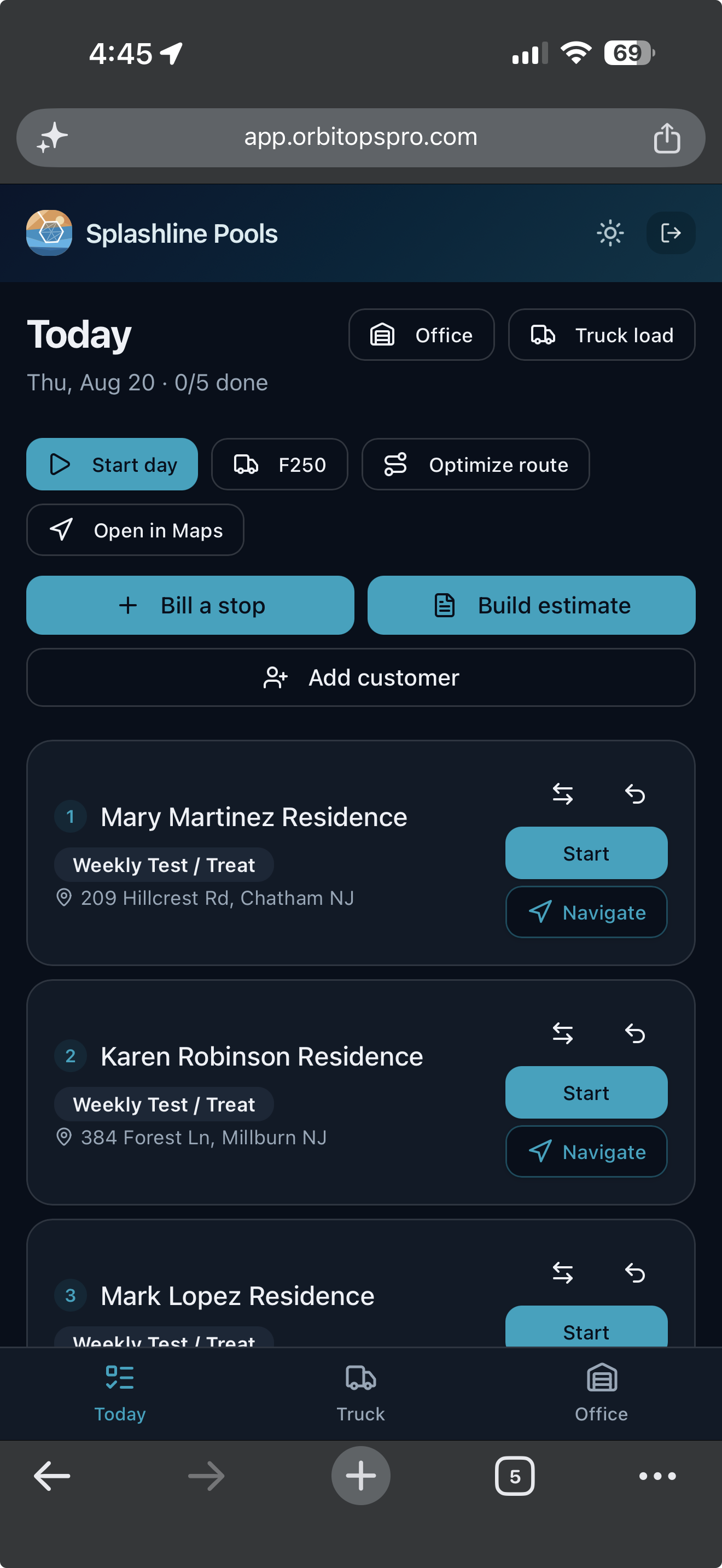
The office builds the week. The tech opens one screen and works down it — and everything recorded on the way is what the invoice gets built from.
Open it and work down the list
Today opens on the stops in order, each with the customer, the visit type and the address, and a count of how many are done. One tap starts a stop, one opens it in Maps. Nobody is calling the office to ask what is next.
What they record is what you bill
Materials, readings and notes are captured at the stop while the tech is standing in it. The visit record is the billing record, so the invoice is built from what happened rather than reconstructed on Friday.
Billing and quoting from the driveway
A tech you trust can bill a stop as they finish it, and build an estimate while they are standing in front of the work. What they bill in the field is past the month-end sweep’s reach, so the same visit cannot also land on that customer’s monthly bill. The billing grant is per tech and yours to give. Quoting from the field is on every plan — the foreman standing in front of the work is the one who knows what it is. Writing the ordered scope onto that quote, photographing what is being quoted, and starting from a quote you have already written come in on Executive.
The reading your customer actually sees
Every pool operator tests the water. Very few can show the homeowner what they found without it turning into a phone call.
Logged at the pool, on the phone
Free chlorine, pH, total alkalinity, cyanuric acid and the rest go into a panel on the visit while the tech is standing at the water — not remembered into a spreadsheet that evening.
Saved to the pool, not the day
Readings attach to that property's history, so the next tech to open the app sees what the water has been doing for the last three months, whoever ran the stop.
Printed on the invoice
The readings and the doses added come out on the bill as a health report the customer can read. The invoice stops being a number and starts being an explanation.
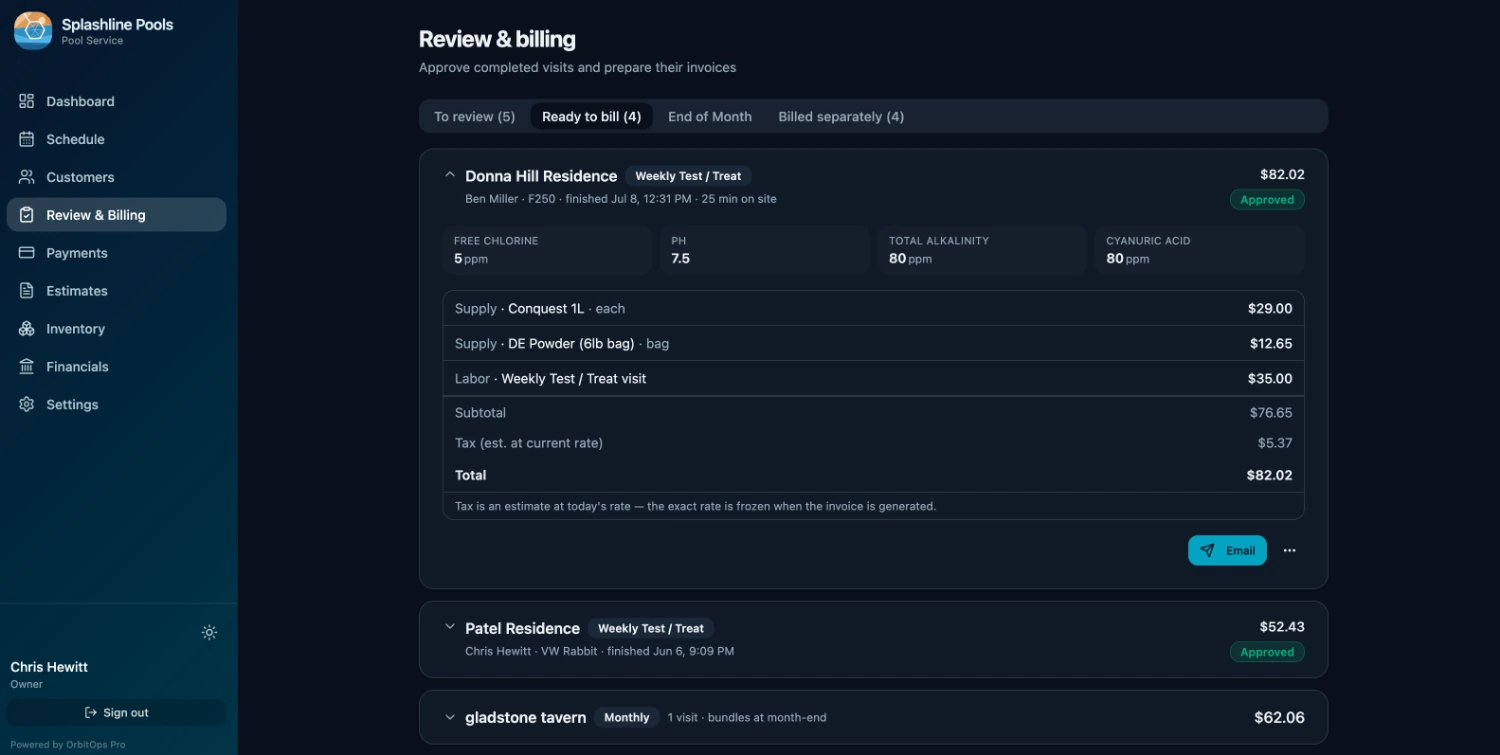
Water chemistry is built into pool service on every plan — it is the trade, not an upgrade.
Two weeks a year that pay for the other fifty
Openings and closings are not just another visit with a different name. They are longer, they carry their own checklist, and they are where a season's margin is won or lost.
Spring Opening, step by step
Remove and store the cover, reinstall drain plugs and equipment, top off the water level, prime and start the system, shock and balance, inspect equipment for damage. The checklist is already there — techs tick it off as they go and it becomes the record of what was done.
Fall Closing, step by step
Balance the water for winter, lower the level, blow out and plug the lines, drain the pump, filter and heater, add winterizing chemicals, install the cover. Nothing gets skipped because the last guy did it differently.
Closed for winter, off the schedule
Closing a pool takes that customer off the schedule automatically — no forecast chips, no carry-over flags, nothing to dismiss all winter. Opening it in spring puts them back on the route. The schedule follows the season without you touching anything.
The repair that comes out of it
An opening that turns up a cracked fitting becomes a quote, on every plan: it goes out for approval and comes back as a scheduled Repair visit with its parts list attached, instead of a note in someone's phone. On Executive, the quote carries the photograph of the cracked fitting and the ordered scope the tech runs as the job’s checklist.
Seasonal work, on the same invoice
The big one-off services compile into the same month-end invoice as the routine visits. One document, everything the month held — the weekly cleans, the opening or the closing, and any repair that came out of it.
The chemicals you pour are the margin you lose
Every truck leaves the yard loaded. Ask an honest operator how much of it makes it onto an invoice and the answer is never "all of it".
Logged where it's poured
The tech records what went in at the pool, on the visit — not from memory on Friday afternoon when three of the week's stops have blurred together.
Used becomes billed
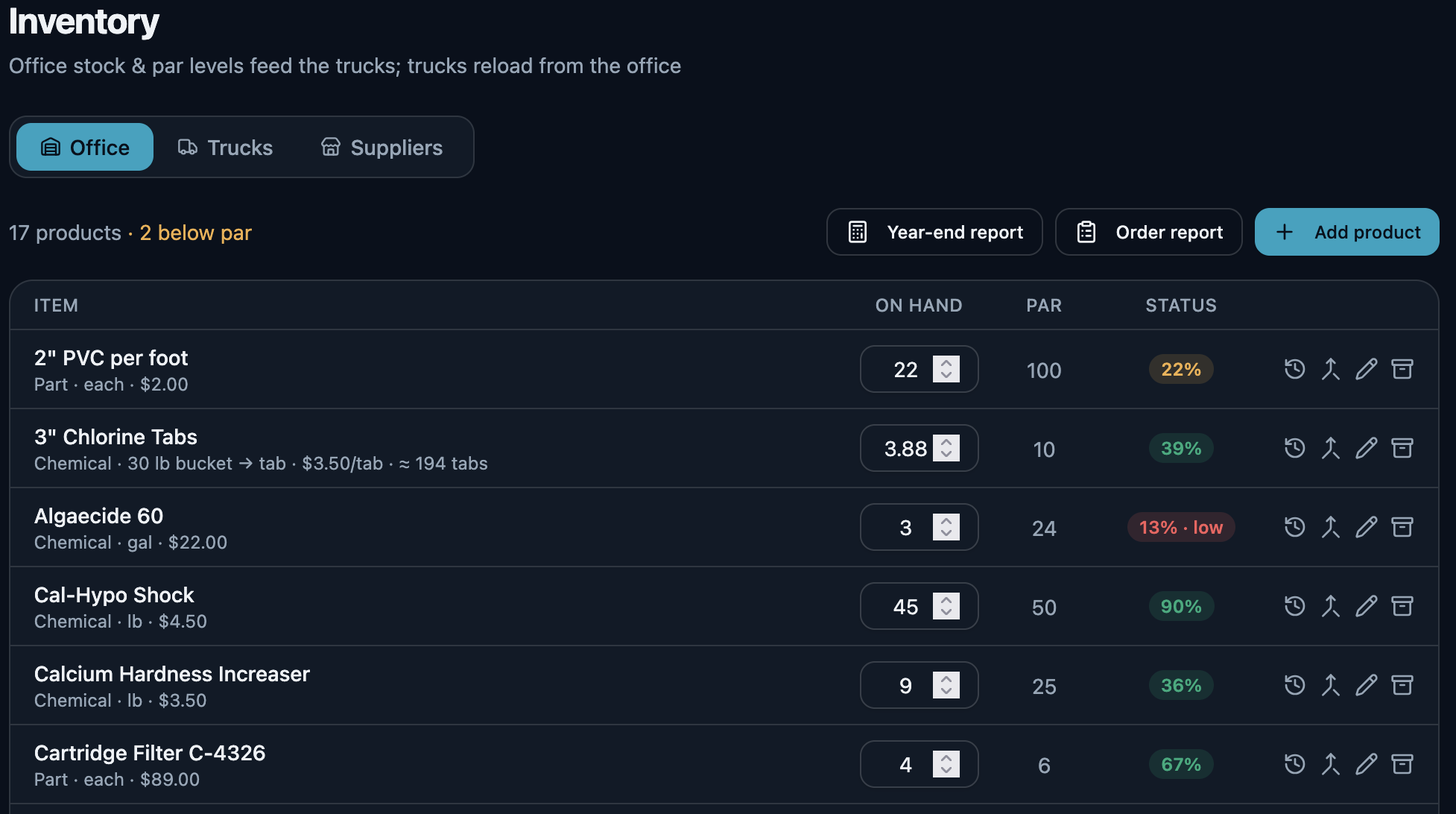
Each logged item lands on the invoice as a line with its price. On Executive and Premier, it also draws that quantity out of truck or shelf stock with its cost attached — one action, both books.
Every move is on the ledger
On Executive and Premier, every item is recorded each time it moves: received from the distributor into office stock, loaded onto the truck, drawn down at the pool, landed on the invoice line. When office stock drops below par, the reorder report starts the loop again — and receiving the delivery back in against that order is the step that closes it. What comes in from the distributor ends up on an invoice, and the ledger holds every step between.
The delivery back in, in one press
The last arrow is the one most systems leave to you. When the order turns up, book it in against the purchase order that raised it: the stock lands on the shelf and the order marks off what arrived, in the same press. Nothing is counted twice — press it again on a bad signal and the second press moves nothing.
- Half now, the rest next week. A short delivery is recorded for what actually came, and the remainder stays open on the order. The next van is a second delivery against the same PO, not a correction to the first.
- You cannot receive more than you ordered. A line that would take the delivered count past what the order asked for is refused, not quietly absorbed.
- A wrong delivery is corrected, never rewritten. Undo one and it takes back exactly what that delivery put on the shelf — read from the record the delivery itself wrote, not recalculated from what the order says today. Nothing is deleted: the reversal is appended beside the delivery, so a delivery that arrived and was taken back stays two facts rather than becoming silence. Miscounted it? The original is kept and reversed, and a new one records what really arrived, linked back to the one it replaces — the same way an invoice is voided and reissued instead of edited.
- All of it, or none of it. If the fourth line on a delivery names a product you have since removed, the first three do not land either. There is no half-received order to unpick.
Inventory tracking and purchase orders come in on Executive. On Premier, the money-recovery reports go further and name the accounts that lose money once the drive and the chemicals are counted against what you bill them.
See what each plan includesReview the month. Generate the invoices.
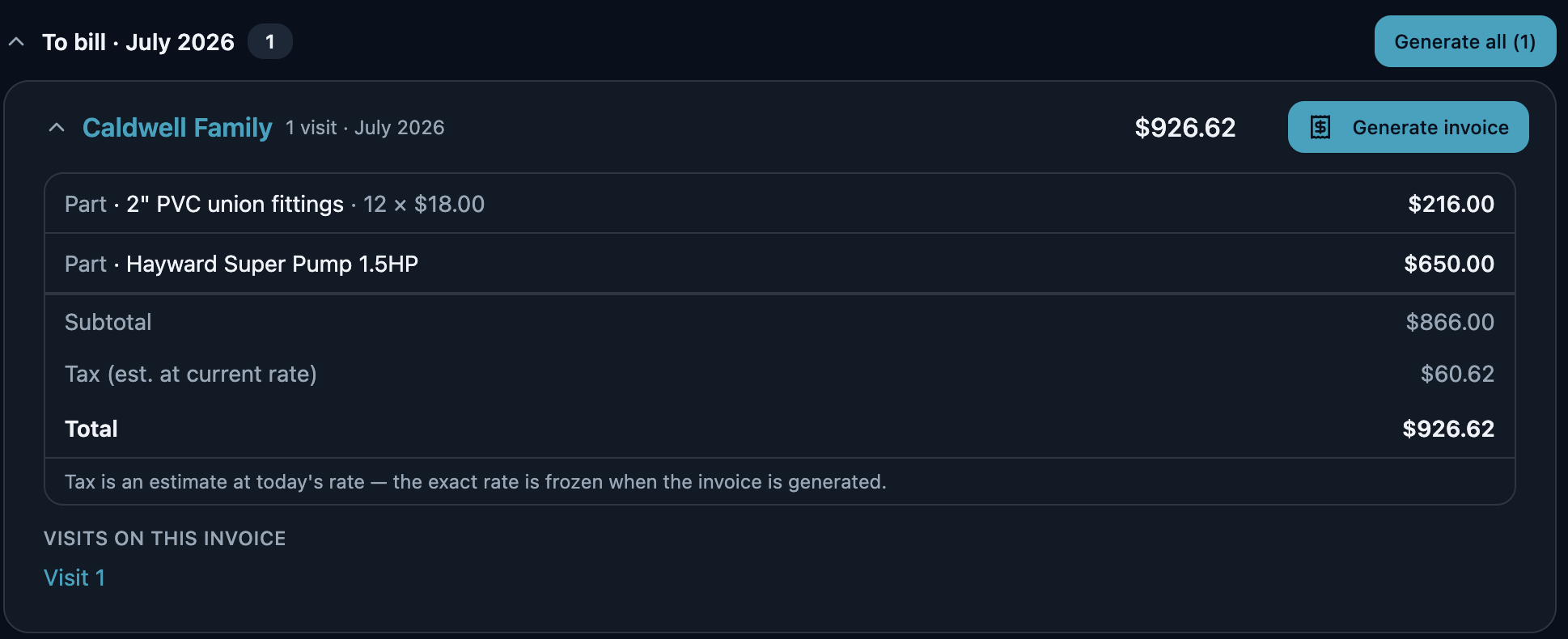
Every visit a tech completes is already on the customer's tab — the weekly clean, the chemicals poured, the fitting replaced after an opening, the opening and the closing themselves. When the month ends, you review what's there and generate the invoices. No shoebox of route tickets, no checking the calendar against the invoice pad, no wondering which jobs never got billed. And if a visit was missed, it's still flagged — work doesn't quietly vanish out of the month.
Billing day is approving work that is already recorded, not entering it a second time. Each customer shows what the month came to and what it is made of; you generate that one, or generate the whole list at once.
The customers still waiting on something you meant to do
A tech writes up a cracked fitting on a Tuesday and nobody quotes it. A customer approves a heater swap and it never reaches a route. These are not leads to chase — they are your own customers, waiting on work you fully intended to do.
- A repair your tech flaggedThe tech closed the visit, wrote down the fitting or the pump that needs doing, and no quote has gone to that customer since.
- A visit that would bill nothingA visit closed, still waiting on your review, and carrying no charge at all — caught before it becomes a month-end invoice that says the same.
- Approved, never scheduledThey said yes to the quote. It never became a job on anybody’s day.
- A quote that went quietSent, and a week has gone by with no answer — long enough that a follow-up still reads as attentive rather than late.
- An agreement coming to its endThe term runs out inside the next two months and it does not renew itself. Agreements themselves are part of Premier.
- A customer nobody has been toStill on your books, still marked active, and ninety days since anyone closed a visit for them.
Every one of these is read off records you already have — visits, quotes, line items, agreements. One line each, and one action each: start the quote, add the charge, book the job, send it again. Anything genuinely fine gets dismissed, and dismissing it is neither a snooze nor forever — the moment something new happens for that customer, the row comes back on its own. The seventh list, warranties about to lapse, reads the warranty date on a part installed against a unit record — so it fills up for the trades that keep one.
And the local post you never get around to writing
The same section turns a job you have already finished into a short local update: the service, the kind of work, the town, the month and its season. No customer’s name, no street address and no price can appear in one, because the facts a post is written from carry no such field. The town is in; the street is not. Here, the seasonal turn is one of the six occasions it writes from.
Ready to copy to Google Business Profile, Facebook, Instagram or Patch. Each one’s length is checked before you copy — past Google’s 1,500-character limit is a problem to fix, past the point Facebook folds the rest behind “See more” is only worth knowing — and nothing is ever cut short for you. Hashtags appear only where the channel takes them.
Another pool closed out for the season in Summerville this week. Closing early is the cheap version of this job: the water is still balanced, the cover goes on clean, and nobody is opening a green pool in April.
We do not post on your behalf and OrbitOps Pro holds no account of yours on any of them. You copy the words out and post them yourself.
What pool operators ask us
Can techs log water chemistry at the pool?
Yes. Test / Treat and Vacuum visits carry a water-chemistry panel the tech fills in on their phone at the pool. The readings save to that pool's history and print on the invoice as a health report the customer can read, so you are not re-keying a paper slip at the end of the day.
How do weekly recurring routes work?
You set a cadence per pool and OrbitOps Pro generates the stops. Each day arrives as a built list your techs work through, and you can cluster a day's stops by location on any plan. On Executive and Premier, route optimization sequences the day and draws it on a map.
Does it handle spring openings and fall closings?
Yes, as their own visit types with their own checklists. Spring Opening covers removing the cover, reinstalling drain plugs and equipment, topping off, priming and starting the system, shocking and balancing. Fall Closing covers balancing for winter, lowering the level, blowing out and plugging lines, draining the pump, filter and heater, adding winterizer and installing the cover.
Will it bill the chemicals my techs actually use?
On Executive and Premier, yes. Techs log what they added at the pool, each logged item becomes an invoice line and draws that quantity down from truck or shelf stock with its cost attached. Chlorine, acid and shock stop leaving the truck without appearing on a bill.
Can I bill monthly instead of per visit?
Either, and you can mix them across your book. Bill a visit the moment it closes, or roll a month of stops into one invoice per pool. Each customer has their own default, set on their record, so the choice is made once for that customer instead of job by job. Both go out with a pay link the customer settles by card, and both are included in every plan.
Can I see which pools are actually making money?
On Premier. The money-recovery reports surface accounts that lose money once the drive time and the chemicals are counted against what you bill them, alongside quotes that never closed and work still sitting unbilled.
Your customers didn't sign up for our software — you did. Their names, addresses and phone numbers stay in your account. Your books get a month of totals rather than your client list, and our own support console can't display who they are.
What leaves your account →Run your pool service business, not your software.
Create your account and get set up in your trade. Scheduling, invoicing and card payments are included in every plan.
Questions first? Talk to us.
Email support@orbitopspro.com to chat with us.