
Tell OrbitOps Pro who's due. It groups nearby stops together, spreads the work evenly across your days and your techs, and puts each route on the tech's phone. That's the entry plan — not an upgrade.
No enterprise contracts. No bloated setup. Built for small to midsize crews.
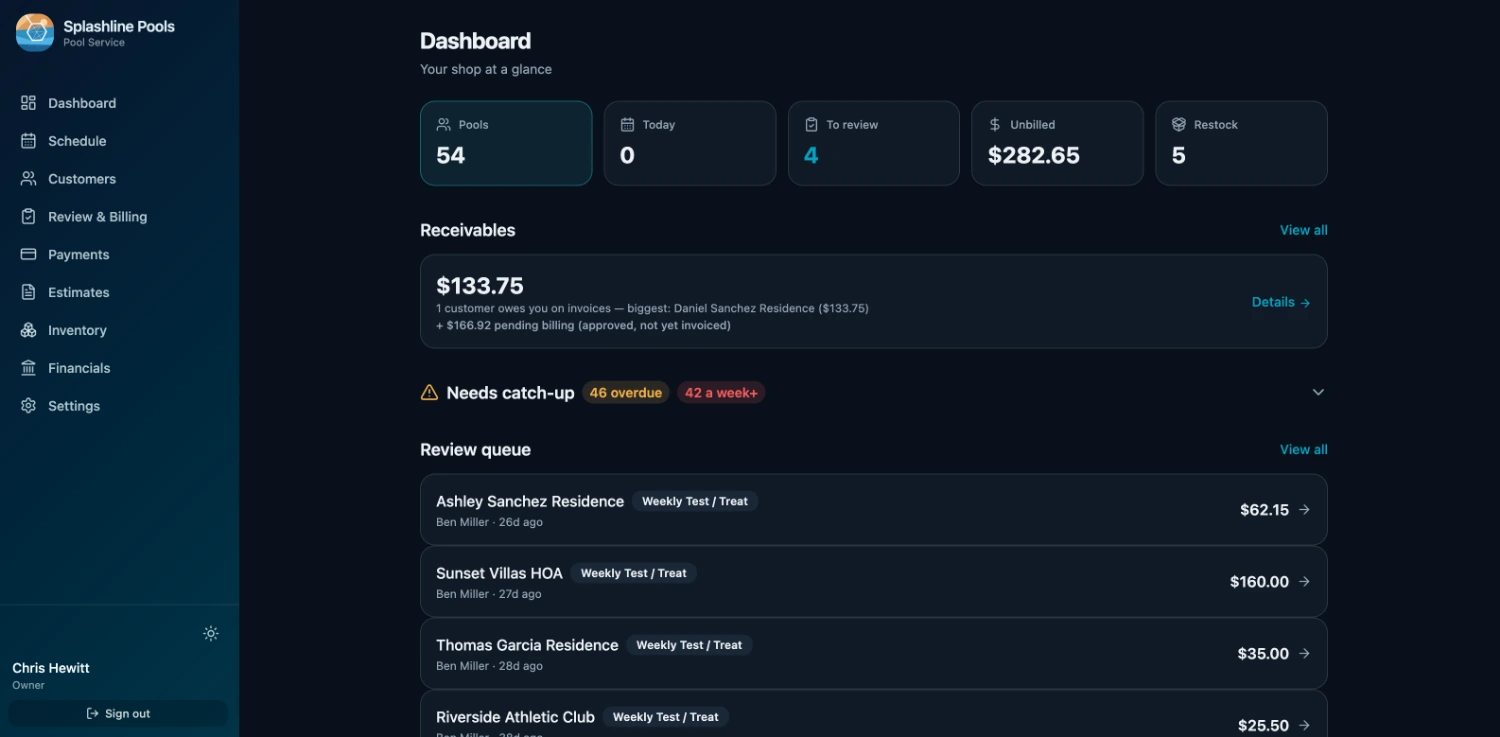
Stop stitching together a calendar, a maps app, an invoice template, and a payment processor. OrbitOps Pro runs the whole job, from booked to paid.
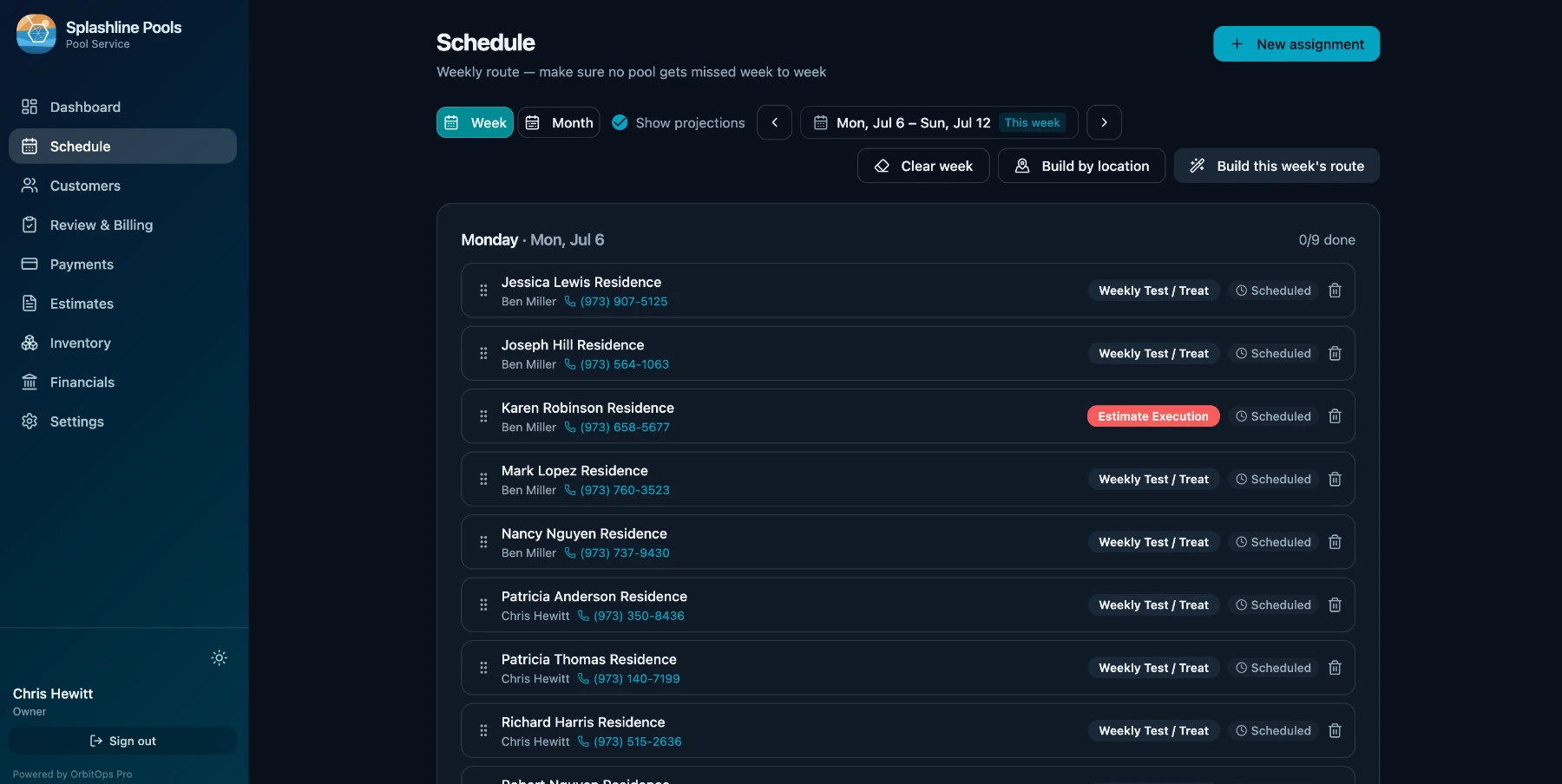
Set who's due and how often, then build the week in one click — every customer that comes due, for every service they are on, including the visits carried over from a week that got missed. OrbitOps Pro groups nearby stops into tight days, balances them across your techs so nobody gets a twelve-stop Monday next to a four-stop Tuesday, and hands each tech their route on their phone.
Second Tuesday of the month, every three months, means exactly that — this year and next. The cadence math is month-native, so a quarterly or bi-monthly customer lands on the same ordinal weekday all year instead of sliding a few days with every cycle.
For every customer still waiting to be scheduled, OrbitOps Pro works out which day absorbs them for the least extra driving and names it before you commit. It is worked out on your own book, so there is no per-lookup cost — and it is choosing the day, not reordering the stops inside it.
Bill each visit the moment the work is done, or compile a month of visits into one clean invoice — whichever fits you and your customers. Each customer has their own default, set on their record, so the choice is made once for that customer instead of job by job. Billing day is then approving work that is already recorded, not entering it a second time: what the tech logged is already on the tab, so you look it over and generate. Finished work goes out the door instead of piling up for the weekend.
Send a pay link with the invoice and your customer pays by card on Stripe's hosted checkout. We take zero percent of your payments. You are the merchant of record and funds settle into your own Stripe account, never through ours — you pay Stripe's rates and nothing on top.
Not a generic jack-of-all-trades. OrbitOps speaks your trade's language — the services, checklists, and pricing your business actually uses, out of the box.
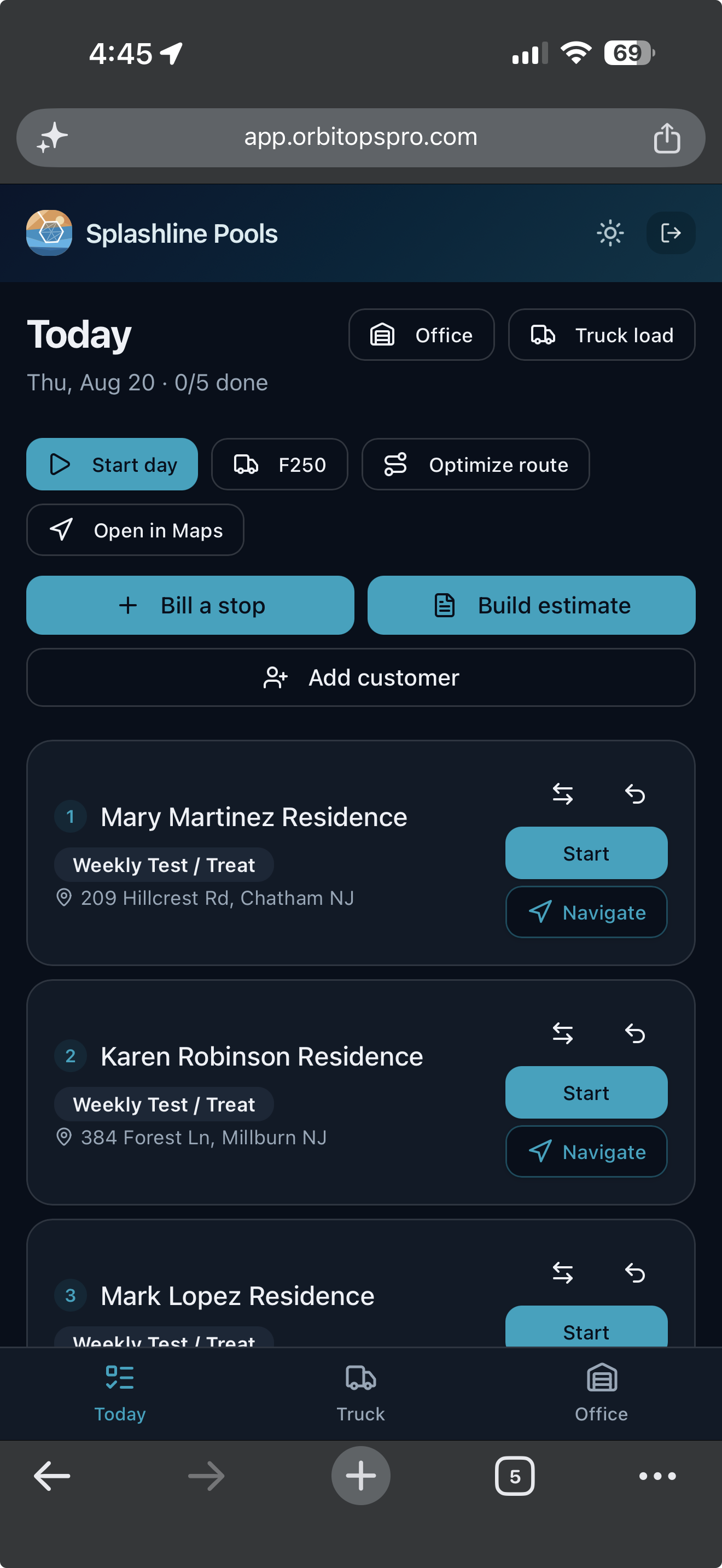
Everything above is the office's half. This is the other one: the person actually doing the work, who needs the day in their hand and nothing else.
Today opens on the stops in order, each with the customer, the visit type and the address, and a count of how many are done. One tap starts a stop, one opens it in Maps. Nobody is calling the office to ask what is next.
Materials, readings and notes are captured at the stop while the tech is standing in it. The visit record is the billing record, so the invoice is built from what happened rather than reconstructed on Friday.
A tech you trust can bill a stop as they finish it, and build an estimate while they are standing in front of the work. What they bill in the field is past the month-end sweep’s reach, so the same visit cannot also land on that customer’s monthly bill. The billing grant is per tech and yours to give. Quoting from the field is on every plan — the foreman standing in front of the work is the one who knows what it is. Writing the ordered scope onto that quote, photographing what is being quoted, and starting from a quote you have already written come in on Executive.
A customer who never hears from you between invoices has no idea what they are paying for. The service report is the answer to that, and it is built from the visit the tech already closed.
What was done, the readings, the photos from the stop, and the materials where you choose to show them — taken from the visit record and sent as a snapshot. The snapshot is what is stored, so months later you can still read exactly what the customer was told. A correction goes out as a new report that supersedes the old one; nothing is rewritten behind them.
Set the hour and the day’s reports go out on their own, in your own time zone. Or run the batch yourself for a date you pick. Either way it is the same send: one report per customer per day, nothing to a customer who has opted out, and nothing at all when the day held no work worth reporting.
Your review link rides along on the report — but never to a customer who owes you money, never to one in the middle of a quote you have sent, never to one who has opted out, and never twice inside the gap you set. What is left is a first visit, a job worth marking, or a customer you have simply served well for long enough.
A tech flags a bad capacitor on a Tuesday and nobody quotes it. A customer approves an install and it never reaches the schedule. These are not leads to chase — they are people who are already yours, waiting on work you fully intended to do. Marketing is seven lists of them, each read off records you already have.
One line each, and one action each — start the quote, add the charge, book the job, send it again. Anything that is genuinely fine gets dismissed, and dismissing it is not a snooze and not forever: the moment something new happens for that customer, the row comes back on its own.
Six occasions your trade already has — an install, the seasonal round, a repair, a before and after, the turn of the season, and thanking the people who called you. Each one is written from a job you finished: the service, the kind of equipment, the town, the month and its season.
No customer’s name, no street address and no price can appear, because the facts a post is written from carry no such field. The town is in; the street is not.
Ready to copy to Google Business Profile, Facebook, Instagram or Patch. The length each one accepts is checked before you copy — over Google’s 1,500 characters is a problem to fix, past the point Facebook folds the rest behind “See more” is only worth knowing — and nothing is ever cut short for you. Hashtags appear only where the channel takes them.
We do not post for you, and OrbitOps Pro holds no account of yours on any of them. You copy the words out and post them yourself.
Another heat pump changeover wrapped up in Summerville this week. Fall is the quiet window for this kind of work — the system is not fighting you, and you are not waiting on the first cold snap to find out it should have been done in July.
A technician’s note is written for the next technician. Turning it into something a customer can read is a job somebody does every billing day, one visit at a time. So is writing the local post about a job you just finished. So is keying in the receipt from the supply house — vendor, date, amount — onto the job it belongs to. Those three are what this does — and nothing else.
The draft comes back to you and stops there. It is not saved to the visit, not attached to an invoice, not posted as a cost and not sent to a customer until you accept it — and accepting it is the same save you would make typing the sentence yourself. Nothing about a job changes because a model wrote something.
Because the app is holding the customer record, it can strike that customer out of the note by name rather than guess at the shape of one: their first name, last name, full name, property name, street, phone and email, wherever those appear. That is what catches “Johnson said it was making a noise”, which no pattern ever could.
Anything shaped like an email address or a phone number, from anyone. Any run of four or more digits. And any whole line that mentions a gate, a lockbox, an alarm, a keypad or a code — the line, not just the number, because “the gate code is the last four of her mobile” carries the secret in words.
A customer surnamed Rose will see “the rose bed” come back scrubbed, and a serial number can come back as a removed number. That lands in a draft you are already reading, and it is one keystroke to put right. The other direction cannot be taken back.
What travels with the note is your trade, the visit type and what was serviced. The request has no field for a customer, a property or a price — so widening it is a visible change to the app, not an accident.
Photograph the receipt from the supply house and it comes back as a vendor, a date and an amount, filled into a cost you were going to type in anyway. What goes out is your own purchase document — what you bought and what you paid for it. That request has no field for a customer, a property or a service address either.
Johnson called — not cooling since Friday.
Low on charge, leak at the evap coil. Added 2 lbs R-410A.
Gate code is 4821, call her first at 843-555-0114.
the customer called — not cooling since Friday.
Low on charge, leak at the evap coil. Added 2 lbs R-410A.
[access details removed]
We found the system low on refrigerant and traced it to a leak at the evaporator coil. We added two pounds of R-410A to get you cooling again, and we have quoted the coil replacement for you to look over.
The writing assist is part of Executive and Premier. On Signature the button is simply not there. More on what does and does not leave your account: what leaves your account.
Every truck rolls out loaded with parts, chemicals, and supplies. How many of them actually make it onto an invoice? For most operators, the honest answer is: not all of them — and the gap between the two is cost you already paid, coming back as nothing.
Materials get recorded where the work happens — not from memory at the end of the week.
What went into the job flows straight onto the invoice. One action, both records: the visit log and the invoice line.
Real inventory levels, draw-down as you go, and reorder before you run out.
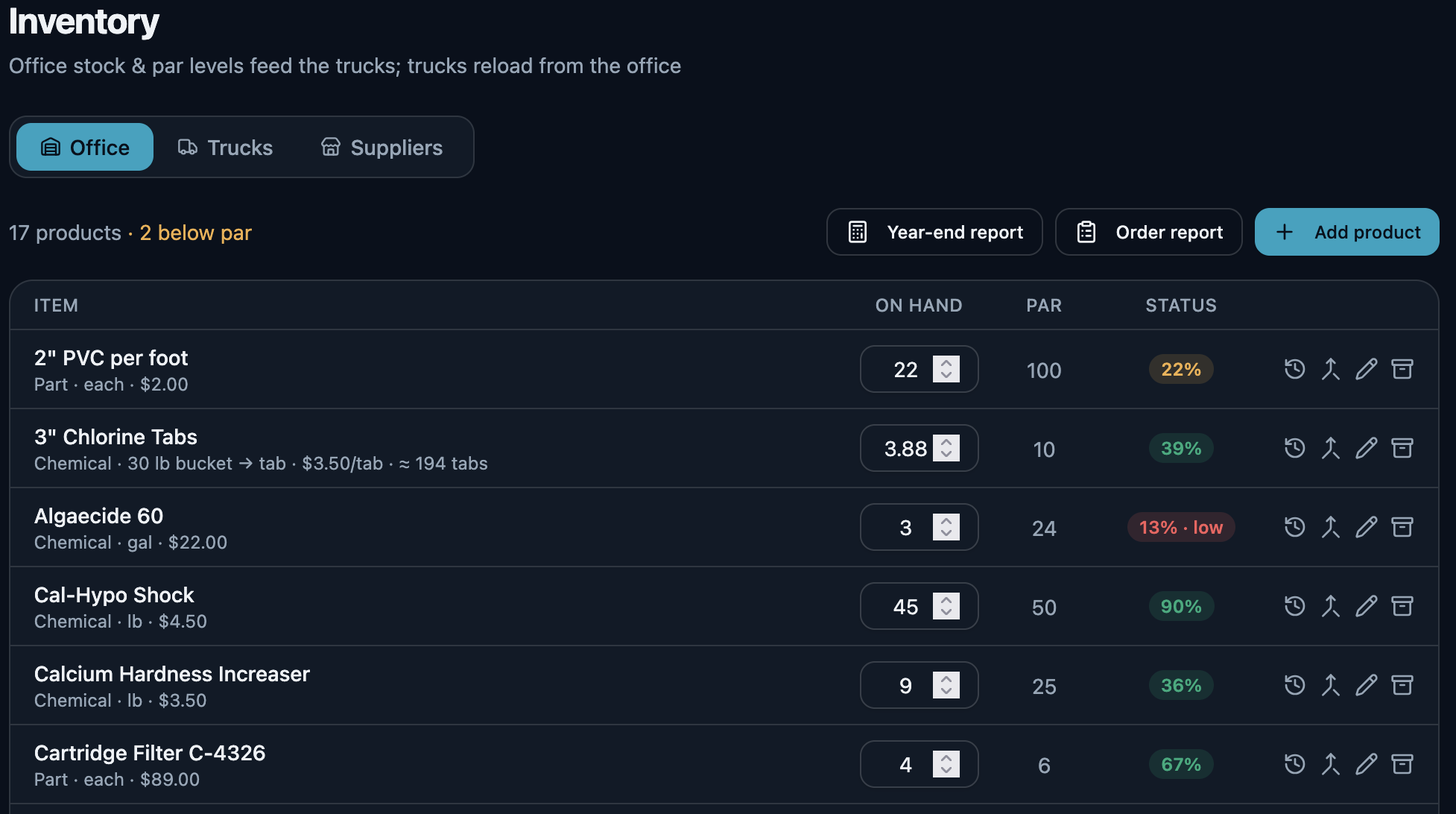
Most field-service tools treat inventory as an afterthought — or skip it entirely. We built OrbitOps around it. Because what comes off the truck goes on the bill.
Inventory tracking — stock, draw-down, reorder, and receiving the delivery back in — is on Executive and Premier. Signature still runs the day: schedule, quote, bill, get paid.
See what each plan includesQuoting, stock on the truck, the compliance record, where the hours went, what your books need at month end. OrbitOps Pro runs those too — on the same data, not in a second system.
Nearby stops grouped into tight days, the work balanced across your days and your techs, and every tech's route on their phone. This is the entry plan doing it, not a trial of something you'll later be asked to pay for.
Executive sequences the stops within each day by real driving time and draws the route on a day map — so the order your tech works in is an efficient one worked out from actual road times, not just the order the stops were added in. It's the step-up that pays for itself in fuel and daylight.
Quote the work, send it for approval, and turn the approved quote into a scheduled job the tech runs with the parts list already in hand. Nothing gets re-typed to bill it. Quoting is on every plan, Signature included — work you priced outside the app and typed again to bill is a one-truck problem as much as anyone’s.
Photograph what you are quoting so the customer sees the part you are talking about. Write the description and the ordered list of what will be done — it prints on the quote, and it is handed to the tech as the checklist for the job. And start the next one by copying a quote you have already written, instead of typing a similar job from scratch.
Give each unit its own record: work billed against it, installed parts with serial numbers and warranty dates, and a permanent service history you can hand a customer on request.
Every product applied on a visit — what, how much, where, which pest, under whose license — captured as the compliance record and printed on the invoice. There when an inspector asks.
Order from the supply house against a supplier record, then book the delivery in with one press — the stock lands on the shelf and the order marks off what arrived. Half an order today and the rest next week is two deliveries against the same PO, with the remainder still open. Press it twice and the second press moves nothing.
Techs clock in and out on their own screen. The hours land against the day's work, so you can see labor cost by job and what each account actually costs you to serve.
The quotes that never closed, the accounts losing money once you count the drive and the materials, and the work sitting unbilled. Three reports that go looking for the gap.
Connect your QuickBooks Online company and OrbitOps Pro posts one summary journal entry for the month, against the accounts you map it to. You trigger each post yourself — nothing is scheduled and nothing runs behind you.
OrbitOps Pro is an independent integration with QuickBooks Online. Included in Executive and Premier.
The homeowner whose address, phone number and gate code sit in your account made a decision about you — not about a software company they've never heard of. So the question worth answering isn't whether we take security seriously. It's narrower: once their details are in OrbitOps Pro, where else do they go?
Mostly nowhere, and we'll show you the specific version rather than the reassuring one.
What leaves your account →Small to midsize service businesses outgrowing spreadsheets and paper, and underserved by tools built for enterprise fleets. Every trade gets a setup that fits how it actually works.
Recurring routes & chem logs
Service calls & estimates
Treatment plans & callbacks
Installs & maintenance plans
Recurring crews & routes
Zones, checks & repairs
Pump-outs & inspections
Installs & repairs
Diagnostics & parts
Service calls, quotes & materials
On-site jobs & commercial routes
Routes & recurring plans
Dock & slip-side service
If your crew works out of a truck, OrbitOps fits the trade — configured for your services, not bent to fit someone else's.
Create your account and get set up in your trade. Scheduling, invoicing and card payments are included in every plan.
Switching from another platform? See how OrbitOps Pro compares.
Email support@orbitopspro.com to chat with us.